



飞牛第三方商店,一键安装,新手福音,不用手动折腾Docker
前言
在使用飞牛(fnOS)的过程中,官方应用商店已经能满足一部分需求,但依然会遇到应用数量有限的问题。
这次分享的是一个 飞牛的第三方商店应用,它可以补充很多官方商店中没有的应用,对新手来说非常友好。
本文记录该第三方商店的 安装方式、仓库源添加方法,以及应用的管理逻辑,供有需要的朋友参考。
安装应用商店
-
下载
FnDepot飞牛安装文件
下载地址:https://github.com/EWEDLCM/FnDepot -
飞牛的应用商店-手动安装
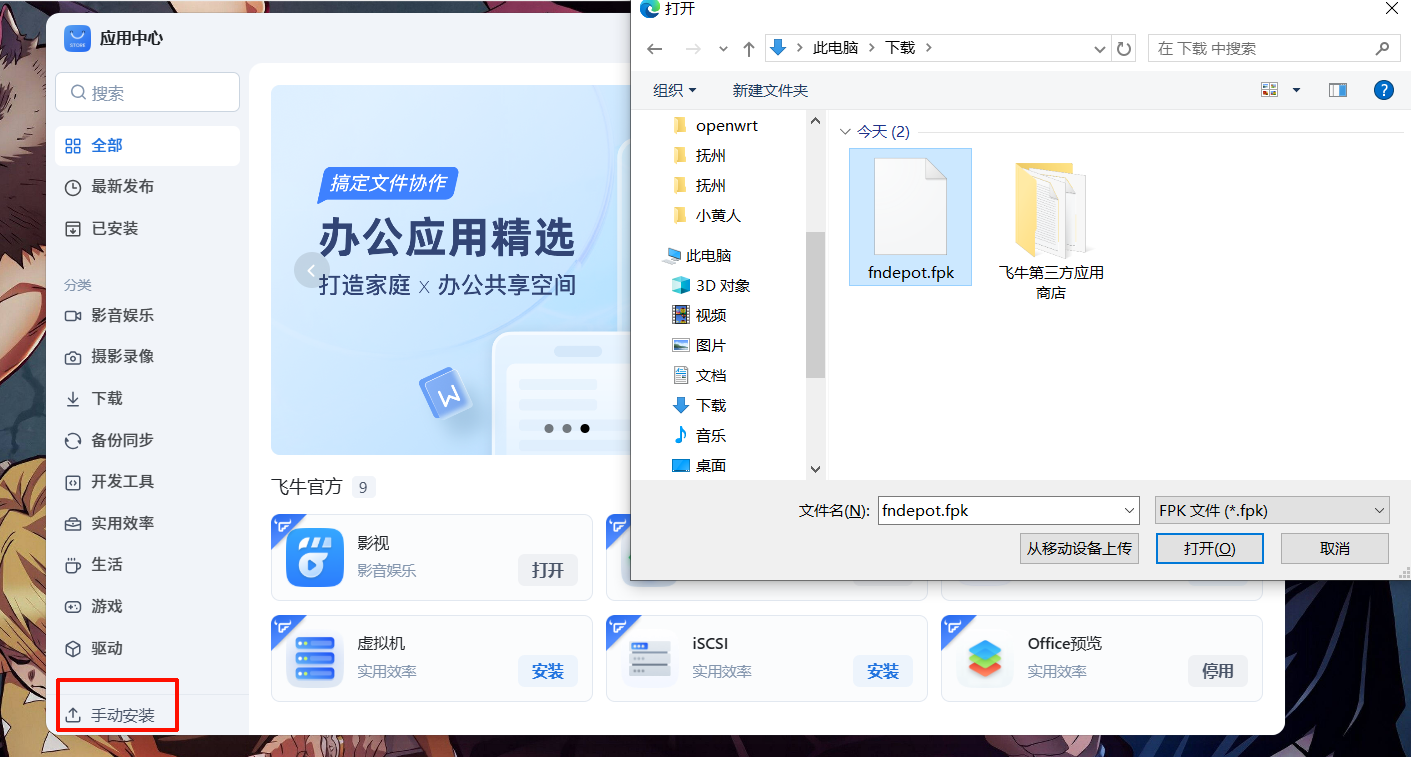
确认来源可信后,直接点击 同意 即可。
-
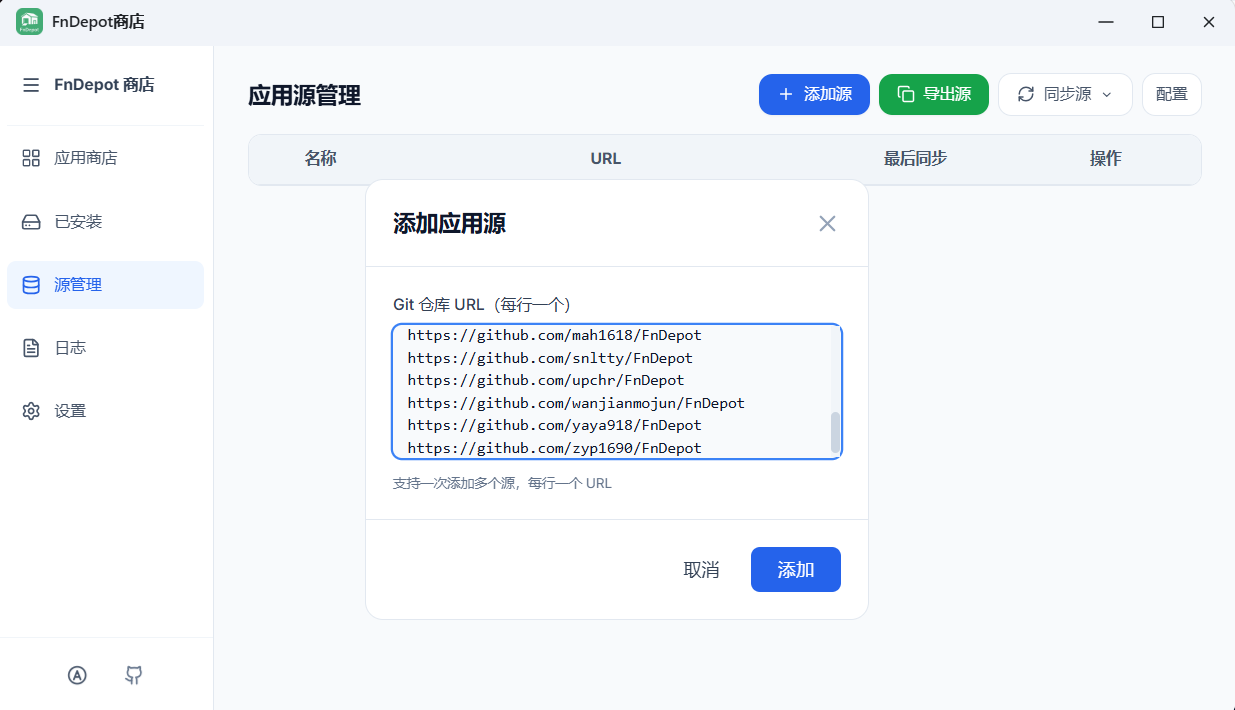
第一次打开第三方商店时,界面是空的,这是正常情况,需要先添加仓库源。
添加步骤如下: 打开第三方商店 - 进入
源管理- 点击添加源- 将仓库源地址粘贴进去https://github.com/yuexps/FnDepot https://github.com/IMGZCQ/FnDepot https://github.com/EWEDLCM/FnDepot https://github.com/hbestm/FnDepot https://github.com/Hxido-RXM/FnDepot https://github.com/710850609/FnDepot https://github.com/jianzhichu/FnDepot https://github.com/RROrg/fn-apps https://github.com/ctllo-bit/FnDepot https://github.com/htnanako/FnDepot https://github.com/KKKK987/FnDepot https://github.com/mac1256/FnDepot https://github.com/mah1618/FnDepot https://github.com/snltty/FnDepot https://github.com/upchr/FnDepot https://github.com/wanjianmojun/FnDepot https://github.com/yaya918/FnDepot https://github.com/zyp1690/FnDepot添加完成后,系统会自动开始同步仓库内容。
-
如果访问github不畅,可以添加加速源
https://gh-proxy.org
https://hk.gh-proxy.org
https://cdn.gh-proxy.org
https://edgeone.gh-proxy.org
https://gh-proxy.com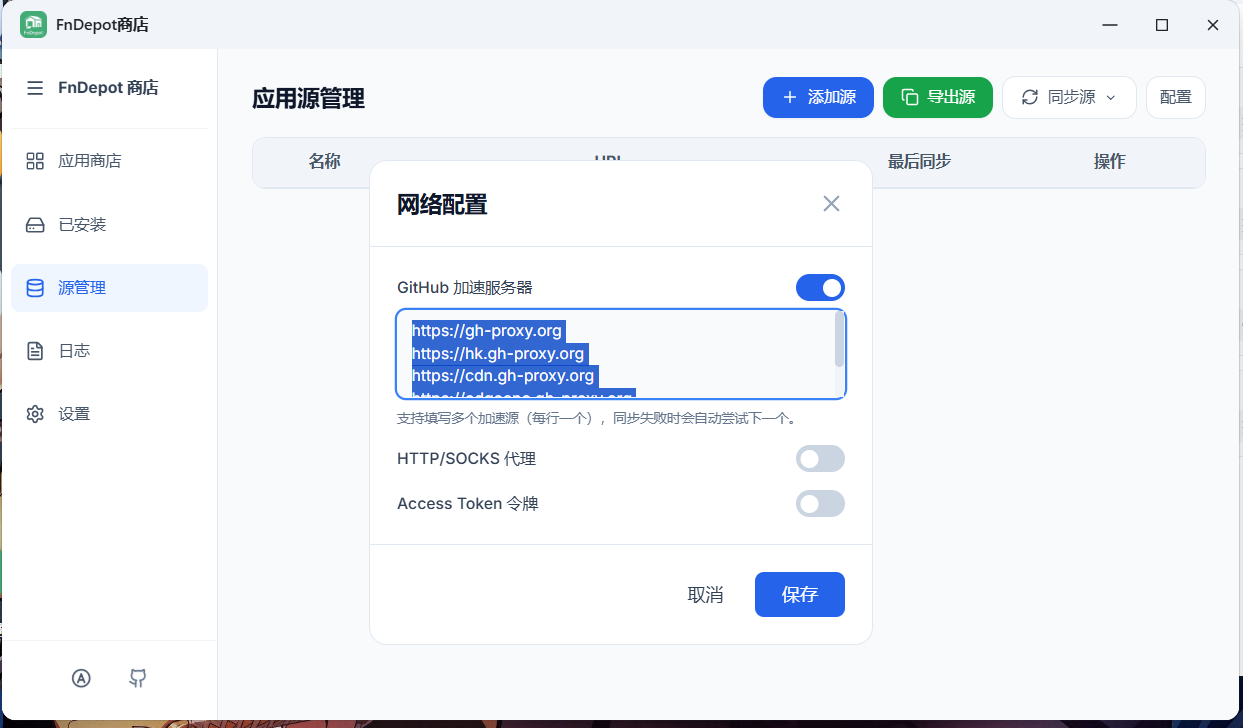
通过第三方商店安装应用
在第三方商店中安装应用的流程非常简单:
- 选择想要安装的应用
点击安装等待完成即可
- 安装完成后: 应用会自动出现在飞牛桌面 ,不需要手动进入 Docker 操作 ,这点对新手非常友好。
关于Docker 的关系说明
虽然这个第三方商店操作简单,但它的底层 依然是基于 Docker 部署的。
你可以在 Docker 管理界面中看到: 对应的容器,相关的 Compose 配置。
如果你有更高级的需求: 也可以自行进入 compose 文件进行微调,不影响第三方商店的正常使用
应用的卸载方式
如果后续不再需要某个应用,有两种卸载方式:
✅ 在 Docker 中直接删除容器
✅ 在 官方应用商店中卸载对应应用
两种方式都可以,按个人习惯选择即可。
本文是原创文章,采用 CC BY-NC-ND 4.0 协议,完整转载请注明来自 无辣的学习笔记
阅读建议
评论
匿名评论
隐私政策
你无需删除空行,直接评论以获取最佳展示效果